Hey there, fellow internet explorer! Ever been cruising the web, minding your own digital business, when suddenly Safari pops up a little warning? You know, the one that says something like, "Your IP address is no longer hidden"? Cue the mild panic, right? Suddenly, your online anonymity feels as flimsy as a paper towel in a hurricane.
But don't hit that panic button just yet! It's not like a digital alarm bell screaming "GASP! THEY KNOW YOUR SECRET SNACK HABITS!" More like a gentle nudge from your friendly neighborhood browser, saying, "Psst, buddy, something changed, and you might want to be aware of it." Let's dive into what this little alert actually means and why Safari bothers to tell you. Think of this as your friendly, no-jargon guide to understanding your digital footprint.
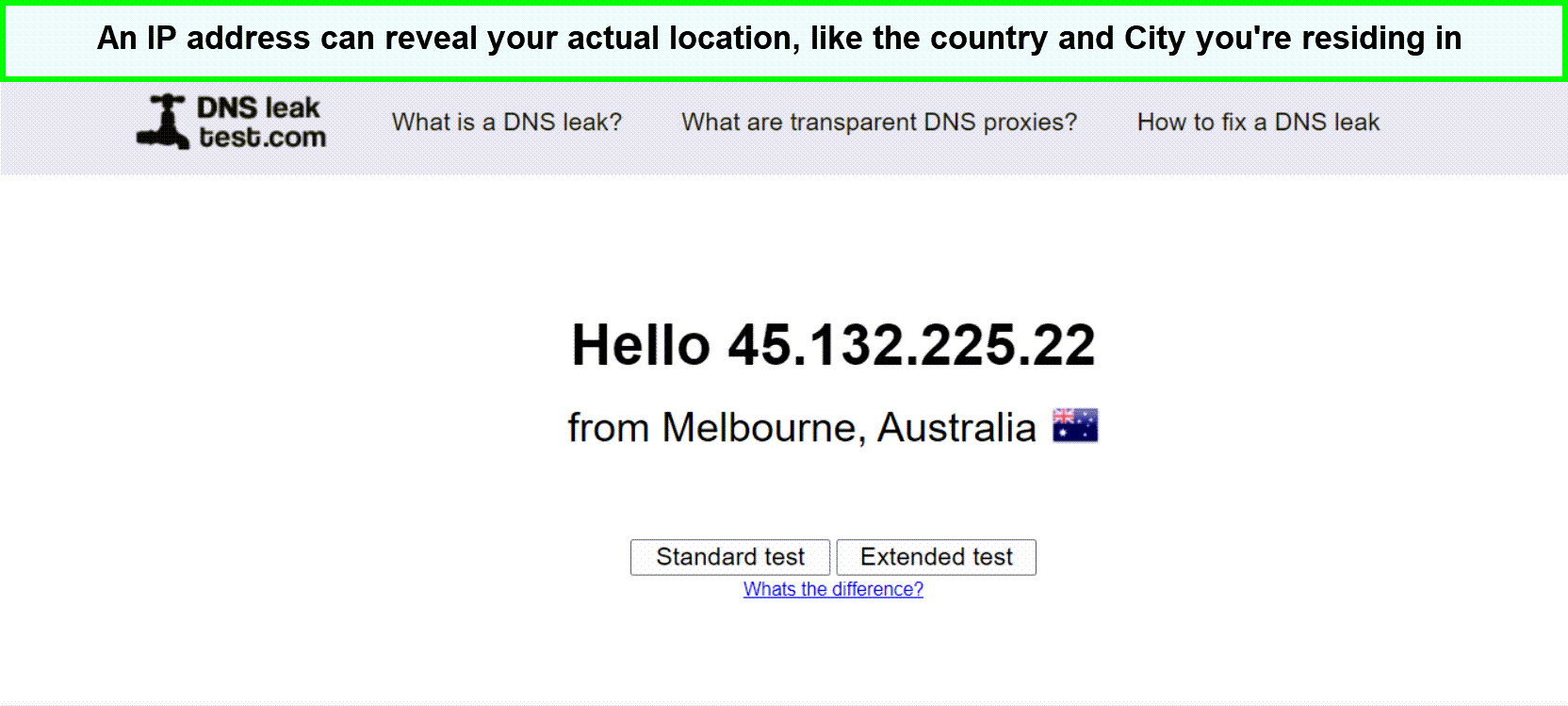
So, what exactly is this mysterious "IP address" they're talking about? Imagine the internet is a massive city, and every device connected to it – your laptop, your phone, even your smart fridge if it's internet-enabled (and let's be honest, it probably is) – has a unique address. That's your IP address! It's like your digital home address, but instead of telling the mail carrier where to deliver your latest online shopping spree, it tells other computers and servers where to send information back to you.
Without an IP address, you wouldn't be able to send or receive anything online. It's the fundamental piece of information that allows the internet to function. It's how websites know who to show their content to, and it's how your device knows where to request that content from. Pretty crucial, huh?
Now, the "hidden" part. This is where things get interesting and where the Safari alert comes into play. When you're using certain tools or services designed to protect your privacy, like a Virtual Private Network (VPN) or a proxy server, they essentially act as a middleman. Instead of your device directly talking to the website, your request goes to the VPN server first. Then, the VPN server makes the request on your behalf, and the website sees the VPN server's IP address, not yours.
Think of it like sending a secret message. You don't want the recipient to know it came directly from you, so you pass it to a trusted friend. Your friend then delivers the message, and the recipient only knows it came from your friend. Your IP address is your true identity, and the VPN's IP address is your friend's temporary identity. Clever, right?
So, when Safari warns you that your IP address is "no longer hidden," it means that this protective layer – your VPN or proxy – has suddenly stopped working or has been bypassed. Your direct connection to the website is back up, and the website can now see your actual IP address. It's like your secret messenger suddenly decided to take a nap and you're back to delivering messages yourself.
Why Does Safari Even Care?
This is the million-dollar question, isn't it? Why is Safari being such a tattletale? Well, Safari, like any good browser, is designed to help you navigate the web safely and securely. When it detects that your IP address is no longer hidden, it's doing you a favor. It's essentially saying, "Hey, you were trying to be a bit more private, and that protective shield just dropped. You might want to know so you can re-engage it if that's your intention."
It's not trying to expose you or sell your browsing habits. Far from it! Safari is your digital wingman, looking out for your best interests. It's like your friend noticing you've accidentally left your front door wide open and kindly pointing it out so you can close it before a rogue squirrel (or a less adorable digital entity) gets in.
Potential Reasons for the "Unmasking"
So, what could have caused your digital disguise to slip? Lots of things, actually! Let's break down some common culprits:
1. Your VPN or Proxy Disconnected: This is the most common reason. Sometimes, VPNs and proxy servers can have temporary glitches. Your internet connection might have flickered, the VPN server itself might have had a hiccup, or your subscription might have expired (oops!). When this happens, your traffic reverts to its normal, unencrypted path.
2. Browser Settings Glitch: While less common, sometimes browser settings can get a little wonky. A recent update, a corrupted cache, or even a rogue extension could theoretically interfere with how your VPN or proxy is working, leading to your IP address being exposed.
3. You're Using a Split Tunneling Feature Incorrectly: Some VPNs offer "split tunneling," which allows you to choose which apps or websites use the VPN and which connect directly to the internet. If you've accidentally configured it so that the site you're visiting is not going through the VPN, then Safari will correctly report that your IP address is not hidden for that specific connection.
4. The Website Itself is Blocking VPNs/Proxies: Some websites are getting smarter about detecting and blocking VPNs and proxies. They might do this for various reasons, like to enforce geographic restrictions on content or to prevent abuse. In this case, even if your VPN is working perfectly, the website might detect it and force your direct connection.
5. Accidental Disabling: It's also possible, in a moment of absentmindedness, that you might have accidentally turned off your VPN or proxy yourself. We've all been there, right? Fumbling with settings while trying to load a page quickly!
6. WebRTC Leaks: This is a bit more technical, but WebRTC (Web Real-Time Communication) is a technology that allows browsers to communicate directly with each other for things like video calls and file sharing. Unfortunately, it can sometimes leak your real IP address even when you're using a VPN. Good VPNs often have features to prevent this, but it's worth being aware of.

7. Using a VPN on a "Guest" Network: If you're connected to a public Wi-Fi network (like at a coffee shop) and you're using your VPN, but then you switch to a different network or your VPN disconnects, your IP address will be revealed as being tied to that new network, not your VPN server.
8. A Confusing Mix of Technologies: Sometimes, people use multiple privacy tools simultaneously, like a VPN and a proxy. This can sometimes lead to conflicts and unexpected behavior, including IP address leaks.
What Does This Mean For You?
Alright, so your secret identity is a little exposed. What's the big deal? Well, it depends on what you were doing and why you were trying to hide your IP address in the first place.
If you were simply browsing the web for general information, the impact might be minimal. Websites might show you slightly different ads based on your perceived location, or some regional content might be inaccessible. Think of it as a very mild version of being spotted by a nosy neighbor.
However, if you were using a VPN or proxy for more sensitive reasons – like accessing geo-restricted content, bypassing censorship in restrictive countries, protecting yourself on public Wi-Fi, or conducting private research – then this alert is definitely more significant. It means that the protection you thought you had is gone, and your online activities could be more traceable than you intended.
Imagine you're trying to anonymously send a letter to a friend. If your disguise fails and someone sees you, it defeats the purpose of being anonymous. Similarly, if you're trying to protect your privacy, a revealed IP address means that protection has failed.

So, What Should You Do When You See the Alert?
Don't freak out! Take a deep breath. Here's your action plan:
1. Don't Panic: Seriously, it’s just a notification. The world isn't ending.
2. Check Your VPN/Proxy Connection: This is the first and most important step. Open your VPN app or check your proxy settings. Is it still connected? Is it actively routing your traffic? If not, reconnect it immediately.
3. Refresh the Page: Sometimes, after reconnecting your VPN or proxy, simply refreshing the page you were on can resolve the issue. The website might then see your hidden IP address again.
4. Try a Different Server: If your VPN has multiple servers, try switching to a different one. Some servers might be experiencing issues or might be blocked by the website you're trying to access.
5. Test Your VPN/Proxy: There are websites designed to check if your VPN or proxy is working correctly and if your IP address is hidden. Do a quick search for "IP leak test" and run one of these to be sure.
6. Review Your Split Tunneling Settings: If you use split tunneling, double-check that the website or application you're currently using is indeed configured to go through your VPN.
7. Clear Your Browser Cache and Cookies: Sometimes, old data can cause issues. Clearing your cache and cookies might help Safari get a fresh perspective.
8. Consider a Different VPN/Proxy: If you consistently have issues with a particular VPN or proxy, it might be time to explore other options. Not all VPNs are created equal, and some are better at evading detection than others.
9. Understand the Website's Policies: If you're repeatedly getting this warning on a specific website, it's possible that website is actively trying to block VPNs. You might need to decide if accessing that site is worth the potential exposure.
10. Re-evaluate Your Needs: Are you using a VPN for basic browsing, or for something more critical? If it's the latter, ensure you have a robust and reliable VPN service that you trust.
Think of it like this: you're wearing a cool disguise to a party, and someone taps you on the shoulder and whispers, "Hey, I think I recognize you!" You don't immediately run home. You adjust your hat, pull your scarf higher, and maybe sidle up to the punch bowl. You take steps to reinforce your disguise, rather than abandoning it entirely.
Safari's alert is a helpful nudge, not a full-blown exposé. It's a chance for you to ensure your online privacy settings are working as you intend them to. It empowers you to take control of your digital footprint.
So, the next time Safari flashes that little warning, don't get your digital knickers in a twist. See it as an opportunity to be a more informed and empowered internet user. You've got this! Keep exploring, keep protecting your precious online self, and remember, the internet is a vast and wonderful place, and you've got the tools to navigate it your way. Happy (and safe) browsing!