Ugh, has this ever happened to you? You're casually scrolling through Instagram, maybe watching a TikTok or two, when suddenly… nothing. The feed freezes. The little spinning wheel of doom appears, mocking your very existence. You try refreshing. Nada. You tap on another app, say, your email. Nope, still a digital desert. Panic starts to set in. Is your Wi-Fi playing up? Did your cat somehow chew through a crucial internet cable in the dead of night? Or, the dreaded thought… is it Apple?
That feeling, right? That moment of delicious uncertainty where you're not quite sure if the digital world has abandoned you or if it's just your own personal internet gremlin causing chaos. It's a familiar dance for many of us iPhone enthusiasts (and let's be honest, who isn't these days?).
Well, buckle up, buttercup, because today we're diving headfirst into the murky waters of Apple server outages. We'll figure out how to tell if your iPhone is throwing a tantrum or if it's a much, much bigger problem happening on Apple’s sprawling, global network of digital goodness.
The Dreaded "Apple Service Unavailable" Moment
There’s a special kind of dread that washes over you when you suspect it’s not just you. You know, the kind of dread that makes you glance around your house, almost expecting to see tiny Apple engineers frantically patching things up in your living room. It’s usually sparked by a cluster of things not working, not just one isolated app. If your Apple Music is playing up, your iCloud drive is refusing to sync, and the App Store is a blank void, then it's a pretty good sign that the issue is beyond your humble abode.
Think about it. Your iPhone is a portal to a universe of services. When multiple of those services suddenly go offline, it’s less likely that your router spontaneously decided to take a vacation. It’s more likely that the vast, intricate machinery that powers those services is experiencing a hiccup. And when that machinery belongs to Apple, well, that hiccup can ripple across the globe.
It’s like having a really bad hair day, but instead of just your hair, it’s the entire internet’s hair. And Apple is responsible for a lot of that hair.
So, How Do We Become Digital Detectives?
Alright, let’s put on our metaphorical trench coats and magnifying glasses. The first thing to establish is: is this an isolated incident, or are we part of a much larger digital drama?
Step 1: The Quick and Dirty "Is it just me?" Test
This is your first line of defense. Before you even think about blaming Tim Cook and his minions, perform a few simple checks:

- Restart your iPhone. I know, I know. It’s the IT equivalent of "have you tried turning it off and on again?" but honestly, it works wonders more often than we’d like to admit. Sometimes, your phone just needs a good old-fashioned reboot to clear its digital cobwebs.
- Check your Wi-Fi. Are other devices in your house (laptops, tablets, that smart fridge that judges your snack choices) working fine on the same network? If they are, your Wi-Fi is probably not the culprit. If they’re also struggling, then your internet provider might be having a moment.
- Try a different network. If you have access to another Wi-Fi network, or even just your cellular data, try using your iPhone on that. If things magically start working, then your home Wi-Fi is definitely the finger you should be pointing.
These basic steps can save you a whole lot of unnecessary panic and online searching. Think of it as your pre-game warm-up before you dive into the serious detective work.
Step 2: The "Are Other People Experiencing This?" Reconnaissance Mission
This is where the real fun begins. If your basic checks haven't revealed the culprit, it’s time to see if you’re part of a global pity party. And thankfully, the internet provides us with some fantastic tools for this.
Enter the Digital Informants: Websites You Need to Know
There are a few trusty websites that act as the unofficial watchdogs of the internet. They aggregate user-reported outages and can give you a pretty solid picture of what’s going on.
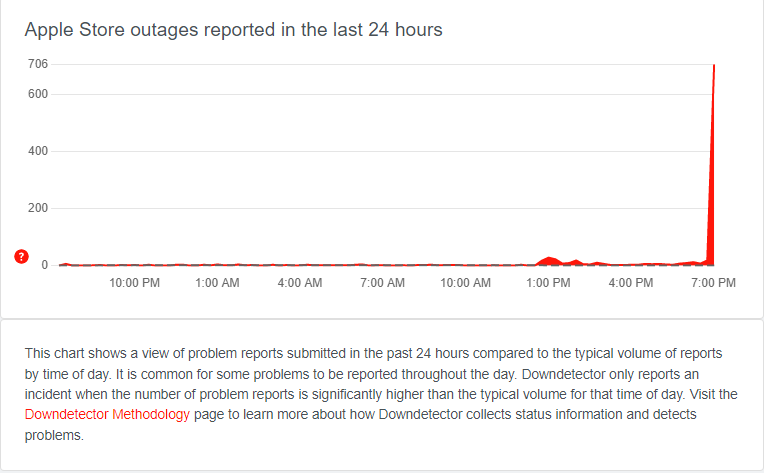
- Downdetector.com: This is probably the king of outage reporting. You can search for pretty much any service, including Apple’s various offerings (Apple Music, iCloud, App Store, Apple ID, etc.). It shows you a live graph of reported issues and a map of affected areas. If you see a massive spike in reports, you’re not alone! This is your go-to. Seriously. Bookmark it.
- Outage.report: Similar to Downdetector, this site also aggregates outage information from various sources. It’s another great place to cross-reference.
When you visit these sites, be specific. Don’t just search for "Apple." Search for "Apple Music outage," "iCloud down," or "App Store not loading." This will give you more targeted results.
What to look for on these sites:
- Spikes in reports: A sudden surge in people reporting issues is a HUGE indicator of a widespread problem.
- Geographic patterns: Are the reports concentrated in your area, or are they all over the world? If it’s global, it’s definitely an Apple issue.
- Specific service affected: Is it just one Apple service, or are multiple services down? If multiple are hit, it's a stronger signal of a core network issue.
It’s kind of like being a doctor and looking at symptoms. If a patient has a cough, it could be a cold. If they have a cough, fever, and shortness of breath, it’s a more serious diagnosis. For Apple services, multiple symptoms point to a systemic issue.

Step 3: The Official Word (When It Comes)
Apple itself has a page dedicated to its system status. This is the most official source you can get, though sometimes it can be a little slower to update than independent sites.
- Apple System Status page: You can find this by searching "Apple System Status" online. It’s a simple page with a list of Apple’s services and a green dot next to them if they're operational, or a yellow or red dot if there’s a known issue. This is the horse's mouth, so to speak.
Now, here’s a little irony for you: sometimes, when Apple services are down, their own System Status page might be slow to load or even inaccessible! It’s a classic "chicken and the egg" scenario, or perhaps a digital paradox. That’s why relying solely on this page might not always be the quickest way to get an answer, especially during a major outage.
What to expect from Apple's status page:
- Clear service status: It will tell you precisely which services are experiencing issues.
- Maintenance notifications: Sometimes, outages are planned for maintenance. This page will often reflect that.
It’s a great resource once things are back up and running, or for checking planned downtime. But for real-time, "oh no, what’s happening RIGHT NOW?!" moments, Downdetector usually wins.
When It's Your iPhone (and Not Apple's Global Network)
So, what if all your detective work points to you and your little slice of the digital pie? What if Downdetector shows green lights for Apple services, and your neighbours' Wi-Fi is humming along just fine?
Then, my friend, it’s time to look inward. Here are some common culprits when it’s just your iPhone:
1. App-Specific Glitches
Sometimes, it’s not the whole system; it's just one particular app throwing a fit. This could be due to:

- Outdated App: Developers are constantly pushing updates to fix bugs and improve performance. If your app is out of date, it might not be able to connect properly to the servers. Always check for app updates in the App Store!
- Corrupted App Data: Over time, an app's data can become corrupted, leading to all sorts of weird behaviour.
- Server Issues with That Specific App: Even if Apple's main services are fine, the servers for individual apps (like a smaller game or a niche social media platform) could be experiencing problems.
What to do:
- Update the app. This is the first and easiest step.
- Force quit the app. Swipe up from the bottom of the screen (or double-press the Home button on older iPhones) and then swipe the app card up to close it. Reopen it.
- Delete and reinstall the app. This is a more drastic step, but it often fixes stubborn app issues. Just make sure you know your login details before you do this!
2. Network Configuration Problems
This is a bit more technical, but sometimes your iPhone’s network settings can get tangled up.
- Incorrect Wi-Fi Password: Did you recently change your Wi-Fi password? Or maybe your phone just forgot it?
- VPN Issues: If you’re using a VPN, it could be causing connection problems. Try disabling it temporarily.
- DNS Cache Issues: This is getting fancy, but sometimes the way your phone looks up website addresses can get messed up.
What to do:
- Forget and Rejoin Wi-Fi Network: Go to Settings > Wi-Fi, tap the "i" icon next to your network, and select "Forget This Network." Then, rejoin it and re-enter the password.
- Reset Network Settings: This is a more aggressive step. Go to Settings > General > Transfer or Reset iPhone > Reset > Reset Network Settings. Be warned: this will delete all your saved Wi-Fi passwords and Bluetooth pairings, so you’ll have to set them up again.
3. iOS Software Bugs
Sometimes, it’s the operating system itself that’s misbehaving. A new iOS update might introduce a bug that affects connectivity for some users.
What to do:
- Check for iOS Updates: If a bug is known, Apple will usually release an update to fix it. Go to Settings > General > Software Update.
- Wait for a patch: If it’s a widespread iOS bug, you might just have to wait for Apple to release a fix.
4. Your iPhone Itself is the Problem
Okay, deep breaths. This is the least common scenario, but it's possible that your iPhone's hardware is experiencing an issue that's affecting its ability to connect to networks.
What to do:

- Contact Apple Support: If you've tried everything else and suspect a hardware issue, it’s time to call in the professionals. They can help you diagnose the problem and arrange for repairs if necessary.
The Art of Patience (and Distraction)
Let’s face it, waiting for a server outage to resolve itself can be incredibly frustrating. You’re used to instant gratification, and suddenly the digital world is on a coffee break. It's during these moments that we learn the true value of… well, living without our phones for a bit. Gasp!
If you’ve confirmed it’s an Apple issue, and you’ve checked their system status page (or Downdetector), the best you can do is to be patient. Apple is usually very good at resolving these issues relatively quickly, especially if they’re widespread. They have legions of engineers working around the clock to keep their digital empire humming.
So, instead of staring at a frozen screen, maybe try looking out the window. Talk to a human being. Read a book. Perish the thought. Or, you know, just refresh that Downdetector page every 30 seconds like the rest of us.
A Final Thought: The Double-Edged Sword of Connectivity
It’s fascinating, isn’t it? We’ve built our lives, our work, our social connections around these vast networks. When they work, they’re incredible. They connect us to information, entertainment, and each other. But when they falter, even for a short while, we feel the impact acutely.
Understanding whether the problem is with your individual device or with the massive, interconnected web of Apple’s services is a crucial skill in our modern digital age. It saves you time, reduces frustration, and helps you troubleshoot effectively.
So, the next time your iPhone feels like it’s gone rogue, remember your digital detective kit. Check the basics, consult the informants at Downdetector, and then, if necessary, look inwards. And if all else fails, just blame the cat. It’s a classic for a reason.
Happy connecting (when it’s working, of course)!